The Flipper gem is amazing, here's how we extended it the Martian way





Our client StackBlitz already had an in-house solution for feature flags in the admin panel. But as the product and team grew (alongside the launch and success of Bolt.new), so did the requirements for this feature: not only the need to enable flags for arbitrary groups of users, but for gradual rollouts, integration with analytics, audits, and so on. They decided on Flipper. Then came the interesting part: bending it to fit all of their different use cases. This is Flipper, the Martian way!
Feature flag systems and Flipper
A feature flag (also called a feature toggle or feature switch) is a conditional that controls in runtime whether a piece of program logic is executed or not. This technique allows you to deploy new code first, but enable it later.
Feature flags give you control: who sees what, and when. This means binary ship/don’t-ship decisions become a dial you can gradually turn.
Thus, instead of shipping code that’s immediately live for everyone, you wrap it in a check—and flip the switch when ready. This also gives you time to react and fix problems before they affect everyone.
In a more sophisticated case, the logic behind that conditional gets interesting fast: you can enable a feature for a specific user, a group, a percentage of traffic, or some combination of all three—evaluated in real time, without a redeploy.
With growth, many products and their teams start to require exactly this complexity.
We have a simple and powerful Martian gem called feature-toggles that’s also quite robust easily extendable with minimal effort. However, the project team decided to give the more advanced and sophisticated Flipper gem a shot.
We won’t cover Flipper basics here: it’s a breeze to incorporate into a project: add the gem, run a command to generate a migration, mount a web interface in the routes along with the admin panel, add a link from there, and write some wiring code to replace your solution with Flipper under the facade and you’re done. Easy-peasy, lemon squeezy!
But still, let’s see how much we can tinker with it to fit client’s needs and wishes. Here’s where the internal complexity of the Flipper gem starts to bear out.
We’ll cover what we did with Flipper gem to fit our needs, from the simplest to trickiest use-cases.
Use-case: enabling feature flags using usernames
At the outset, the support team wasn’t satisfied with the default Flipper IDs (e.g. User;42 where 42 is the database identifier) and wanted to use more human-friendly usernames to enable feature flags for users and teams, rather than “cold” machine identifiers.
In the application code you can just pass a model instance to enable an actor and Flipper will automagically figure out its identifier by calling the flipper_id method.
But internally, in its web UI, Flipper uses the Flipper::Actor class which, by default in flipper_id, simply echoes the input that’s been passed to it. Time to patch that class and find the actual user by username or email!
module Flipper::Actor::ByFriendlyId
  def object
    return @object if defined?(@object)

    @object =
      case @flipper_id
      when /\A@/ # @username
        User.find_by(username: @flipper_id.delete_prefix("@"))
      when /.+@.+/ # email@example.com
        UserEmailAddress.confirmed.find_by(email: @flipper_id)&.user
      when /[\w\d-_]+/ # organization slug
        Organization.find_by(slug: @flipper_id)
      else
        nil # fall back to the original flipper_id in the next method (e.g. `User;42`)
      end
  end

  def flipper_id
    object&.flipper_id || super
  end
end

Flipper::Actor.prepend(Flipper::Actor::ByFriendlyId)
The trick here is to redefine the flipper_id method on the internal Flipper::Actor object and try to guess what model the user wants, find it, and call its flipper_id method which was automatically added by Flipper gem (returning User;42 or Organization;42).
The last bit is to tell users that they should use usernames instead of Flipper IDs in the UI:
Flipper::UI.configure do |config|
  config.add_actor_placeholder = "@username, email, or organization slug"
end
And that’s it!
Use-case: enabling features for all the members of a team
This one actually is a bit hacky since feature flags are usually checked against users, but in our case we want to enable them for whole teams (while still checking against users). This means that we want to enable a feature for one kind of actor, and check it against another kind of actor.
Following the group_dynamic_lookup Flipper example, we can achieve this by creating a custom group that will be used to test feature flag enablement not only for the team itself (as a declared actor), but also for users that are its members.
Flipper.register(:organization_members) do |actor, context|
  next false unless actor.respond_to?(:organization_members)

  combos = context.actors_value.map { |flipper_id| flipper_id.split(";", 2) }
  org_ids = combos.filter { |cls, _id| cls == "Organization" }.map { |_cls, id| id.to_i }
  next false if org_ids.empty?

  actor.organization_members.exists?(organization_id: org_ids)
end
And voila! Now we can enable a feature only for an organization and have it enabled for all team members in just 2 steps:
- Enable a feature flag for the organization_members group
- Add specific organizations as actors using their URL identifier (slug)

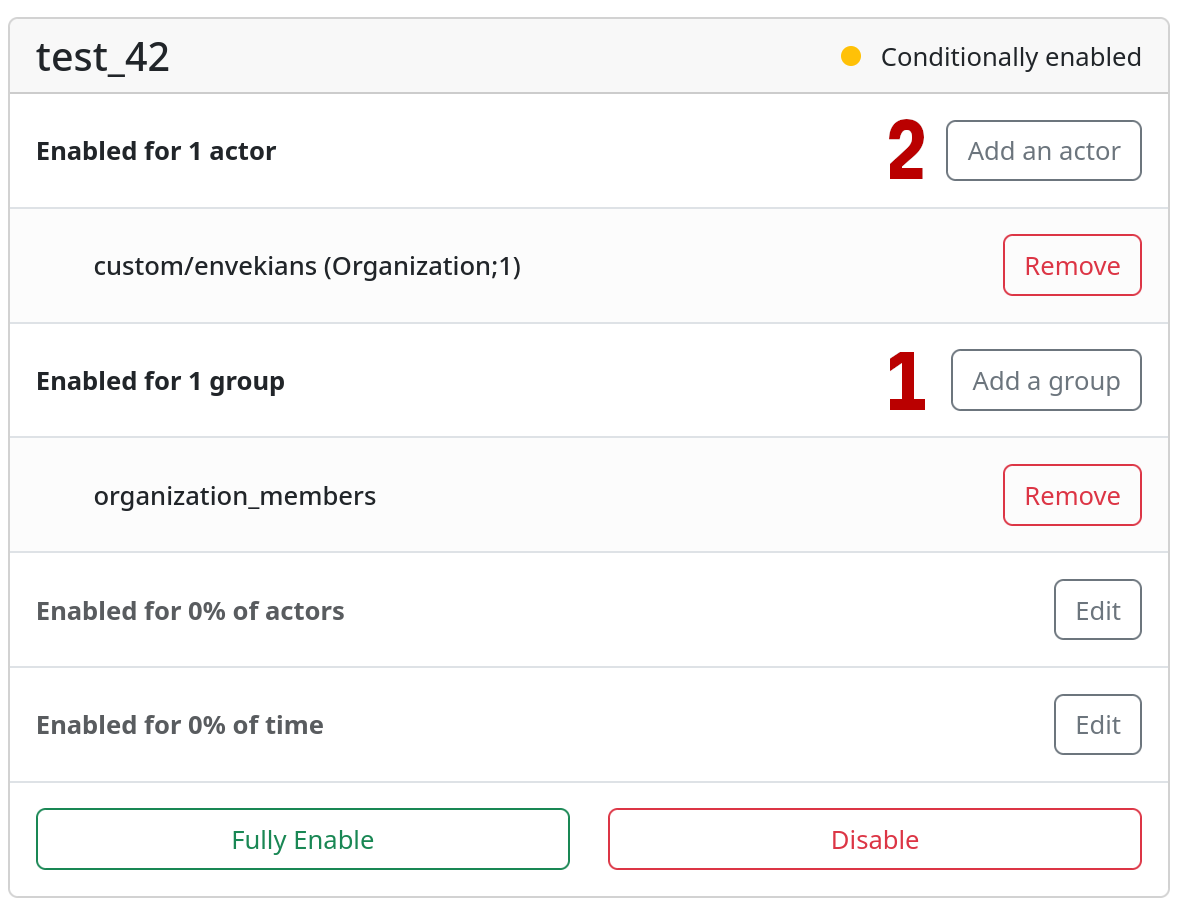
How to enable feature flag for organization members
Now, any check of a feature flag against a user will return true if they are a member of any organization for which the feature flag is enabled.
Use-case: sending feature flag enablement events to analytics
Feature flags are essential for running A/B tests. But to compare experiment success for different user cohorts, you actually need to know which users had a specific feature flag enabled for them.
This one may sound simple, but given that Flipper supports enabling feature flags for a percentage of actors or for custom groups (that we’ve just covered), it’s not as straightforward as it may seem.
In Flipper itself, a percentage check is internally implemented as a hashsum calculation, and this is a clever and efficient solution: it’s fast, stable, and doesn’t require storing any data at all.
But if we want to get all the users that fall into the enabled percentage, there’s no way except iterating over all of them and recalculating the hash function again (requiring a call to the enabled? method for each user with exactly the same arguments).
Another problem here is the volume of events generated. If we enable some feature for 50% of our user base, we’ll need to send a ton of events to the analytics engine (exhausting our quotas).
Moreover, after discussing the requirement with the client’s data team, we found that they actually don’t need to know the moment when a feature flag has been flipped, but rather the moment when its enabled state was actually first observed by a user.
Flipper makes this simple to achieve thanks to built-in instrumentation support!
To implement this, we’ll need to remember the moment when a feature flag was first seen as enabled for a user. We’re using the default ActiveRecord adapter for Flipper, so we can leverage our own database to track this.
Here’s the Rails migration and model:
class CreateFlipperRemembers < ActiveRecord::Migration[7.1]
  def change
    create_table :flipper_remembers, id: false, comment: "Logs when a feature was seen enabled for an actor for the first time" do |t|
      t.string :feature, null: false
      t.string :actor, null: false, comment: "The actor's `flipper_id`"
      t.jsonb :metadata
      t.datetime :created_at, null: false, default: -> { "CURRENT_TIMESTAMP" }

      t.index %i[feature actor], unique: true
      t.foreign_key :flipper_features, column: :feature, primary_key: :key, on_update: :cascade, on_delete: :cascade
    end
  end
end

module Flipper
  class Remember < ApplicationRecord
    self.table_name = "flipper_remembers"
  end
end
Here we create a minimalistic table to record these moments, with a foreign key to the main flipper_features table to allow the database to clean up records for dropped feature flags (you’re cleaning up your stale feature flags, right? …right?!)
Then, we subscribe to the events generated by the Flipper and create a record in our database:
ActiveSupport::Notifications.subscribe("feature_operation.flipper") do |event|
  case event.payload[:operation]
  when :enabled?
    next unless event.payload[:result]
    next unless event.payload[:actors]
    next if event.payload[:gate_name] == :boolean # Don't track fully-enabled features

    event.payload[:actors].each do |actor_object|
      user = nil
      metadata = {url: Current.controller&.request&.referer, gate: event.payload[:gate_name]}

      case actor_object.actor
      when User
        user = actor_object.actor
      when Organization
        next unless Current.user
        next unless Current.user.organization_members.exists?(organization_id: actor_object.actor.id)

        user = Current.user
        metadata[:organization_id] = actor_object.actor.id
      else
        next # skip guests
      end

      next if user.nil?

      remember = Flipper::Remember.create_with(metadata: metadata.compact.presence).find_or_create_by!(
        feature: event.payload[:feature_name],
        actor: user.flipper_id,
      )

      # Send analytics event only if this is a newly created record
      next unless remember.previously_new_record?

      Analytics::Tracker.feature_flag_enabled(
        **metadata.compact,
        feature: remember.feature,
        user_id: user.id,
        timestamp: remember.created_at.to_i,
      )
    end
  end
rescue ActiveRecord::RecordNotUnique
  # Ignore possible race condition (transaction savepoint rollback was handled by find_or_create_by!)
end
Tradeoffs:
-
To save bandwidth and database space, we stop recording and emitting events when a feature flag is fully enabled. This usually means that an experiment is over and that event is no longer interesting. Often, stale feature flags remain undeleted for a long time.
-
We don’t track the moment when a feature flag has been disabled and re-enabled (e.g. if it was enabled for a smaller percentage of users).
-
We don’t “lock” a user that has seen a feature flag enabled in the enabled state (although it might be useful for a better user experience). That said, it’s possible to implement, just not at Flipper adapter level (as adapters always load all data from database to memory by design), rather, only via monkey-patching/prepending custom module to Flipper API overriding the
enabled?method.
Use-case: auditing feature flag enablement
We’re now stepping a bit into Flipper Cloud territory, which has audit log out-of-the-box. But this setup wasn’t on the cloud and the client wanted to have all the admin actions on the same page.
Again, let’s leverage the same instrumentation and also Rails current attributes to track who switched what.
The problem here is that the Flipper Web UI isn’t a Rails application or engine: it doesn’t have Rails controllers or models, it’s just a standalone Rack web app. This means it also doesn’t have our current_user. But it’s still Ruby, so we can work around it!
For this to work, we need to add a custom middleware to the Flipper UI app’s Rack stack:
# config/initializers/flipper.rb
class Flipper::SetCurrentAttributes
  def initialize(app)
    @app = app
  end

  def call(env)
    Current.rack_env = env
    Current.user = env["warden"]&.user
    @app.call(env)
  end
end
And then wrap Flipper::UI.app in this middleware:
# config/routes.rb
flipper_app = Rack::Builder.new do
  use Flipper::SetCurrentAttributes
  run Flipper::UI.app
end

mount flipper_app => "/admin/feature_flags", :as => :flipper
After this, we can access Current.user in the event handlers from Flipper instrumentation to get the user who made the change:
ActiveSupport::Notifications.subscribe("feature_operation.flipper") do |event|
  operation_action_mapping = {
    enable: "enable",
    disable: "disable",
    add: "create",
    remove: "destroy",
  }

  next unless operation_action_mapping.key?(event.payload[:operation])
  next unless Current.user
  next unless Current.rack_env

  request = ActionDispatch::Request.new(Current.rack_env)
  resource = Flipper::Adapters::ActiveRecord::Feature.find_by(key: event.payload[:feature_name])

  Admin::AuditLog.create!(
    user: Current.user,
    username: Current.user.username,
    controller: "admin/flipper/features", # There is no real controller
    action: operation_action_mapping.fetch(event.payload[:operation]),
    params: request.filtered_parameters,
    ip_address: request.remote_ip,
    user_agent: request.user_agent,
    session_id: request.session.id,
    resource:,
  )
end
Hence forth, no flip will slip through the cracks!
The last bit is adding a link from the audit log page to the Flipper UI where the feature flag can be enabled/disabled, so auditing admin can quickly undo actions from the audit log.
Though Flipper UI doesn’t have a separate page for each feature flag or even id attribute on the feature flag list, we can work around this by using URIs with text fragments:
 url_params =
   case log_entry.resource
+  when Flipper::Adapters::ActiveRecord::Feature
+    [:flipper, anchor: ":~:text=#{log_entry.resource.key}"]
   else
     [:admin, log_entry.resource]
   end

 url = url_for(url_params) rescue nil # rubocop:disable Style/RescueModifier
 link_to_if(url, log_entry.resource.to_param, url)
In the end…
What else is there to say? Flipper is straight up awesome, and we saw it ourselves once we had a chance to tinker with it and managed to bend it in all ways we wanted. Yep, it’s just damn amazing!