600+ million people write right-to-left: 2 fixes your app needs




You shipped, the app works, users sign up. Then a bug: “The input field doesn’t work properly.” Turns out their language is Arabic. When typing a prompt, text renders left-to-right. This meant alignment was off, punctuation lands on the wrong side, and the whole sentence reads garbled. When a user can use a right-to-left language, even English apps will break. This isn’t an edge case. Hundreds of millions of people write right-to-left. Still, most developer tools treat this as an afterthought. In this post, we’ll see how for most, the fix is just two HTML attributes.
In languages like English, Spanish, or Portuguese, text flows left to right. In languages like Arabic, Urdu, or Hebrew, it works the opposite: text starts at the right edge, flows leftward, and the entire layout follows; punctuation, alignment, and the way text is read all run in the opposite direction.
LTR: Hello, world!
RTL: !مرحبا بالعالم
// In Arabic, the exclamation mark lands on the left as the entire line reads right to left
Most developers who haven’t worked with RTL languages don’t have a clear mental model for what supporting them actually requires. Nor do they realize there are actually two distinct situations that need entirely different solutions. This confusion is so widespread, even LLM-generated fixes get it wrong: a common suggestion is to use navigator.language to detect direction, which doesn’t solve the problem at all (more on that below).
The languages affected aren’t rare edge cases: over 600 million people write right-to-left. We ran into this directly while working on bolt.new: the interface is in English, but users need to type their prompts in their own language and read the agent’s responses in that same language—even while the app itself stays in English.
Your solution will depend on which scenario you’re in: one where only user inputs might be in a right-to-left language, and one where the entire interface—navigation, content, layout—needs to flip to RTL when the user needs it.
Why dir="auto"—not navigator.language—is the answer for English-only apps
Your app is in English and your UI is LTR. When users type in input fields, some of them type in Arabic or Hebrew. The text comes out backwards. More precisely, it comes out in the default LTR rendering when it should flip to RTL.
The common mistake (including in some LLM-generated solutions that we’ve seen) is to detect the user’s preferred language from navigator.language and set the direction accordingly. This approach fails for an obvious reason: navigator.language tells you the browser’s locale setting, not what’s being typed in a given field at a given moment. A user whose system is set to ar-SA might type English. A user whose system is set to en-US might type Arabic.
You cannot infer content direction from a system preference. Instead, the correct fix is one HTML attribute:
dir="auto".
<textarea dir="auto" />
<input type="text" dir="auto" />
When dir="auto" is set, the browser inspects the first strongly-directional character in the field’s content and sets the text direction accordingly. This means RTL if it starts with Arabic or Hebrew, LTR if it starts with Latin script. It updates in real time as the user types. This happens without JavaScript, language detection, or runtime overhead. The browser handles it.
In fact, this is exactly what we shipped for bolt.new. While the interface is in English, their users can now type their prompts in whatever language they think in—and the agent responds in kind. So, a developer in Cairo types their instructions in Arabic; the prompt input needs to handle that gracefully, and so does the agent’s text output—everywhere it renders plain text rather than code blocks or terminal output. dir="auto" solves it.
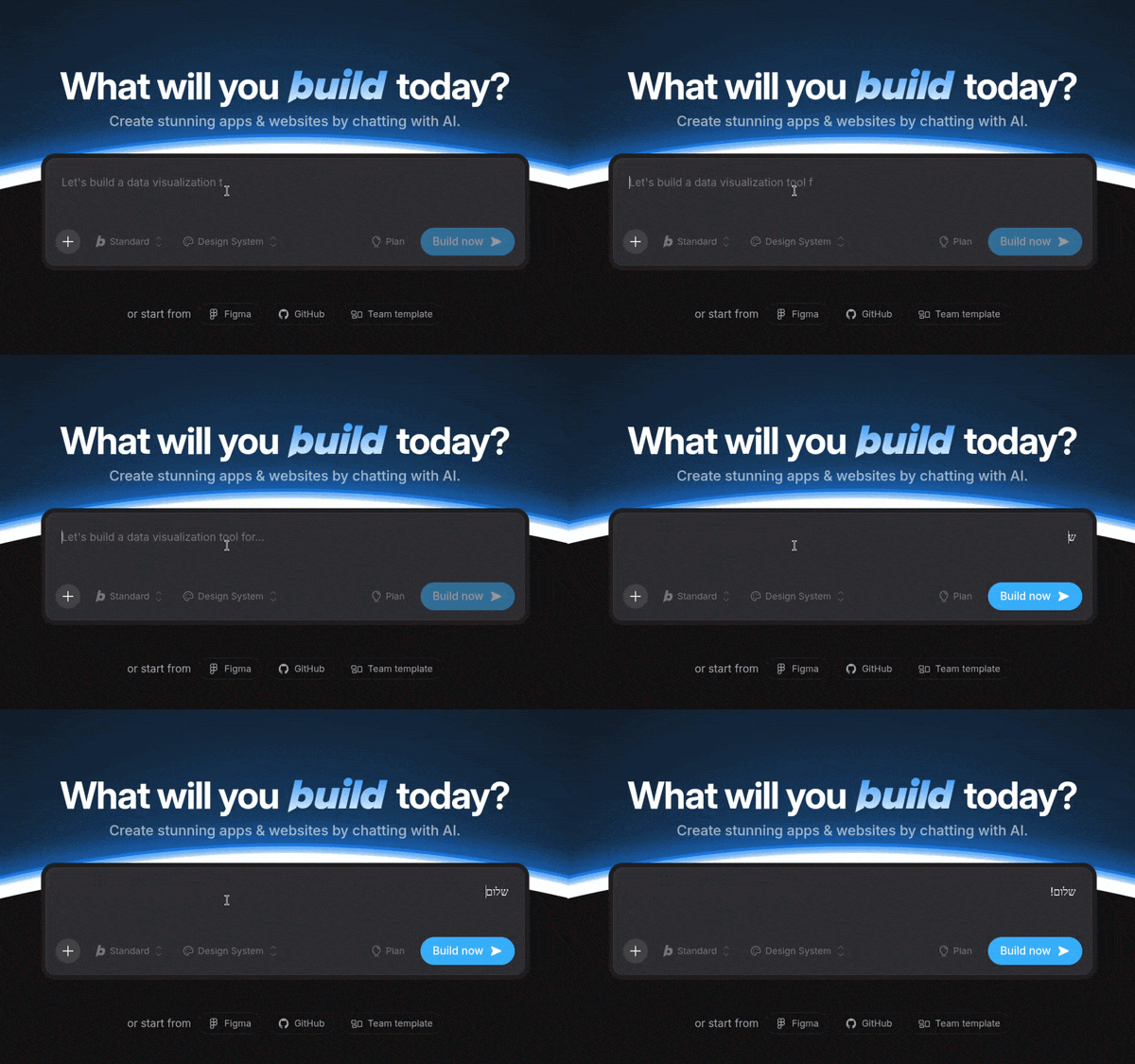
Typing in Hebrew on bolt.new
But if dir="auto" solves the problem so cleanly, why isn’t it the default on every input? Because dir="auto" determines direction from the first strongly-directional character. Yet, in short or constrained fields, that character often isn’t there. For instance, a field starting with a number, punctuation, or a space gives the browser nothing to infer from, so it falls back to the inherited direction, which may produce a visible flicker or misaligned cursor.
Bottom line here: reserve dir="auto" for free-form fields where a user might type a full sentence: chat inputs, prompt fields, comment areas, note editors. Skip it on everything with predictable, constrained content.
When RTL goes deeper: supporting a fully localized UI
The second situation is different in kind, not just degree. Your app supports multiple languages via a locale switcher: English, Arabic, Hebrew in the dropdown. When a user selects Arabic, the entire interface needs to flip: navigation moves to the right, sidebars swap sides, the content reading direction reverses, and yes, inputs need to handle RTL text too.
This is where a single dir attribute on individual fields doesn’t get you far enough. What you actually need is dir="rtl" on the <html> element itself, and CSS Logical Properties throughout your stylesheet.
Set direction at the root
<html dir="rtl" lang="ar">This single attribute cascades direction context through the entire document. Text, inline content, and many layout behaviors follow it automatically. Here’s how to handle it in practice (note that you can find the extended list of the RTL scripts here):
// All RTL locales your app supports.
// Extend this list as you add new languages.
const RTL_LOCALES = [
  'ar',    // Arabic
  'he',    // Hebrew
  'fa',    // Persian (Farsi)
  'ur',    // Urdu
  'ps',    // Pashto
  'sd',    // Sindhi
  'ug',    // Uyghur
  'yi',    // Yiddish
  'dv',    // Dhivehi (Maldivian)
  'ku',    // Kurdish (Sorani)
];

function getDirection(locale: string): 'rtl' | 'ltr' {
  return RTL_LOCALES.includes(locale) ? 'rtl' : 'ltr';
}


// app/[locale]/layout.tsx
// Next.js App Router passes the [locale] dynamic segment from the folder name
// as a param — e.g. /ar/dashboard resolves locale as "ar".
export default function RootLayout({
  children,
  params: { locale },
}: {
  children: React.ReactNode;
  params: { locale: string };
}) {
  return (
    <html lang={locale} dir={getDirection(locale)}>
      <body>{children}</body>
    </html>
  );
}
Use CSS Logical Properties, not physical ones
This is the part that trips up most developers. If your stylesheet uses margin-left, padding-right, border-left, and text-align: left throughout, you’ll spend hours manually overriding every physical direction when RTL is active. CSS Logical Properties eliminate that problem at the source.
This goes beyond just mirroring the layout. Direction carries meaning: a progress bar that fills left to right feels natural to an English speaker because it maps to how they read—start to finish, left to right. For an Urdu speaker, that same bar fills in the wrong direction: it starts at the “end” and moves toward the “beginning”. It’s not just a visual quirk—the interface is telling the user they’re going the wrong way.
Logical properties let you express that the bar should fill from inline-start to inline-end, and the browser maps that correctly to whichever direction the user reads in. Instead of physical properties:
/* Don't do this */
.sidebar {
  margin-left: 24px;
  border-right: 2px solid #eee;
}

.content {
  text-align: left;
  padding-left: 16px;
}
LTR (English)
✓ Looks correct
RTL (Arabic), same CSS
✗ Margin, text and border stay on wrong sides
Use logical equivalents:
/* Do this instead */
.sidebar {
  margin-inline-start: 24px;
  border-inline-end: 2px solid #eee;
}

.content {
  text-align: start;
  padding-inline-start: 16px;
}
LTR (English)
✓ Margin at start (left), border at end (right)
RTL (Arabic)
✓ Margin at start (right), border at end (left)
inline-start maps to left in LTR and right in RTL. inline-end maps to right in LTR and left in RTL. The browser handles the translation. Your code states intent—“this element starts here”—and the rendering engine interprets it correctly for whichever direction is active.
Check this MDN page to see all the CSS logical properties and how they work with different writing systems in detail.
Browser support for CSS Logical Properties is excellent across all modern browsers. There’s no reason to use the physical alternatives for new code. And to make sure they don’t creep back in, add the Stylelint property-layout-mappings rule to your Stylelint config. Without it, physical properties will sneak back in on the next PR—written by a teammate or generated by an LLM that doesn’t know your conventions.
What about free-form user inputs in a localized app?
In a fully localized interface, inputs are inside a document that already has dir="rtl" at the root. Most inputs will inherit this correctly. But for inputs that accept free-form user text—where someone might type in a language other than the current UI language—add dir="auto" on the element itself to override the inherited direction based on actual content. The two techniques compose cleanly.
<!-- In a fully RTL interface -->
<input type="text" dir="auto" placeholder="ابحث..." />
The inherited dir="rtl" from the root handles the placeholder text and default state. The dir="auto" on the element overrides it based on what the user actually types.
The implementation checklist
If you’re adding minimal basic RTL support to an English-only app:
- Add
dir="auto"to every free-form text input and textarea in your app - Skip it on constrained fields: email, phone, URL, numeric
- Don’t touch
navigator.languagefor this—it doesn’t know what’s being typed
If you’re adding full locale-switching with RTL languages:
- Set
dir="rtl"on<html>when the active locale is RTL - Audit your CSS for physical direction properties and migrate to logical equivalents where it’s needed
- Add
dir="auto"to free-form inputs inside RTL contexts - Test with actual right-to-left content—don’t just flip the UI and call it done
Where this goes wrong in practice
A few traps that you should keep in mind while implementing the solution:
The icon flip trap. Directionality-neutral icons—brand logos, stars, clocks—should not flip in RTL. Directional icons—back arrows, forward arrows, chevrons indicating navigation direction should. CSS transform: scaleX(-1) applied conditionally to directional icons handles this cleanly.
The flexbox trap. Flexbox respects dir on the flex container, so flex-direction: row will reverse in RTL automatically if your HTML direction is set correctly. This is usually what you want. Where it isn’t (some decorative layouts where the visual order should stay fixed regardless of reading direction) you need direction: ltr explicitly on that container. Know which layouts are directional by nature and which are decorative.
The real cost of skipping this
There’s a business case here that goes beyond “being nice to international users.” Over 600 million people write right-to-left—Arabic, Hebrew, Persian, Urdu—and internet adoption in those regions is still growing. Developer tools that handle Arabic and Hebrew well are still rare—most developer-facing products treat RTL as an afterthought, if they consider it at all.
Basic RTL support for the prompt input was one of those small product decisions we made together with the bolt.new team—because the product should let users write in the language they think in, not only in English. Even that minimal change opens the door to users who want to prompt in Arabic, Hebrew, or any other right-to-left language.
Most don’t ship this yet, so your competitors probably didn’t either. A two-attribute change and a CSS audit could put you ahead!